

Food and beverage businesses work with stock that does not last forever. Every batch of juice, milk, or bread has its own expiry date, and two units of the same product are not interchangeable when one expires next week and the other next month. Every order has to come from the right batch, kept in the right storage zone, and shipped before it expires.
Apache OFBiz, the open-source ERP from the Apache Software Foundation, can track all of this. Each batch carries its own expiry date, the store can reserve the earliest-expiring stock first, and recipes connect raw materials to finished products. Doing this by hand means getting products, batches, storage zones, suppliers, and production steps exactly right, and one missing field can roll back the entire import.
This tutorial shows a faster way. You describe your business in plain language, an AI assistant turns it into Apache OFBiz data, you review what it understood, and you import one file. Below, we cover what the setup involves, how to build it with AI, and what to check before deciding whether Apache OFBiz fits your operation.
What does a perishable goods setup in Apache OFBiz actually require?
A representative perishable configuration is not one screen of data. It is roughly a dozen entity types that have to agree with each other.
Products come first, and they are not all the same kind of thing. A bottled juice is a finished good. The juice base you press in-house is a subassembly with its own bill of materials. The oranges you buy are a raw material with supplier terms instead. The bill of materials linking them lives in the ProductAssoc entity, whose primary key includes fromDate, because a bill of materials is time-bound. Leave that date out, and the import fails.
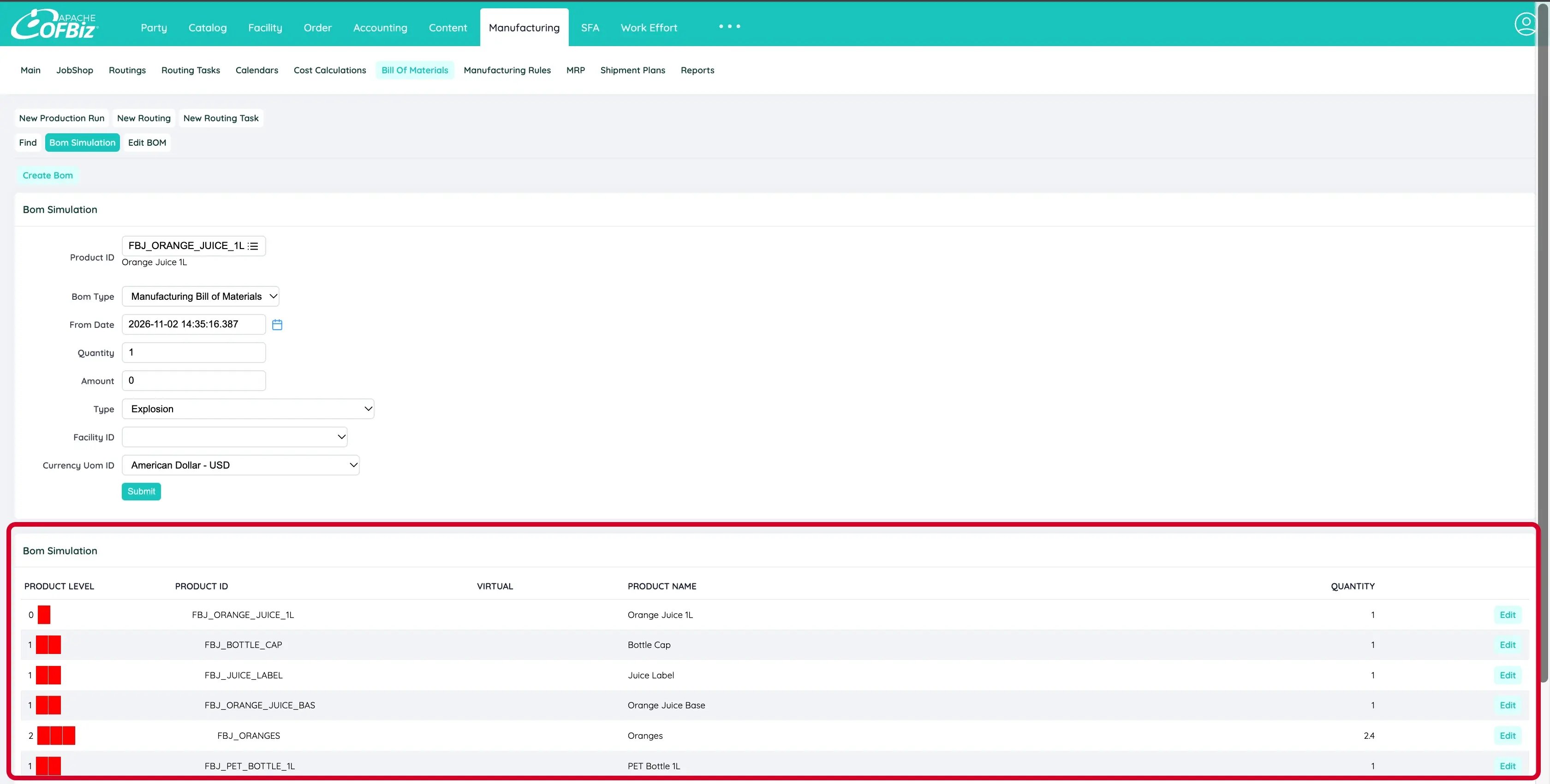
The generated bill of materials for Orange Juice 1L: the juice base is an in-house subassembly, made from 2.4 kg of oranges per litre.
Then the stock itself. Apache OFBiz records expiry against the batch rather than the product, so a Lot carries the expiry date and an InventoryItem ties that batch to a product, a facility, and a storage location. Stock loaded without a location is often invisible to picking, which gives you a setup that imports perfectly and then shows nothing available to sell.
Suppliers are where most people lose an afternoon. SupplierProduct has a five-field primary key covering product, party, currency, minimum order quantity, and availableFromDate. Unlike almost everything else in the data model, it has no fromDate at all. Pricing has its own version of this: ProductPrice needs six key fields, including productStoreGroupId set to _NA_.
Production has a trap of a different kind. You can create a routing, create its tasks, sequence them correctly, and still watch Apache OFBiz run production against DEFAULT_ROUTING, because nothing told it which product the routing belongs to. That link is a single ROU_PROD_TEMPLATE row, and it fails silently rather than loudly.
Finally, the store setting that decides which stock ships first. reserveOrderEnumId set to INVRO_FIFO_EXP reserves the earliest-expiring stock. Set to INVRO_FIFO_REC, it goes by arrival date instead, which looks almost right until the week it costs you a pallet.
None of this is obscure. It is simply a lot of exact values, and Apache OFBiz takes the whole file or none of it.
How do you set it up in four steps?
This is the short version of the setup. We have documented the complete, detailed process on the Apache OFBiz community wiki, including the business questions, the full prompt, import instructions, verification checks with screenshots, and troubleshooting. The link to the full guide is at the end of this section.
1. Describe your business. Write down what you sell and in what sizes, how long each product lasts and how it is stored, what you make yourself and what you buy in, who supplies you and on what terms, and where you hold stock. A paragraph is enough.
"We bottle orange juice and green juice in 330ml and 1L, both kept chilled. We press our own juice base from oranges we buy from a local grower, then fill both bottle sizes from it. We also resell a frozen mango pack we don't make ourselves."
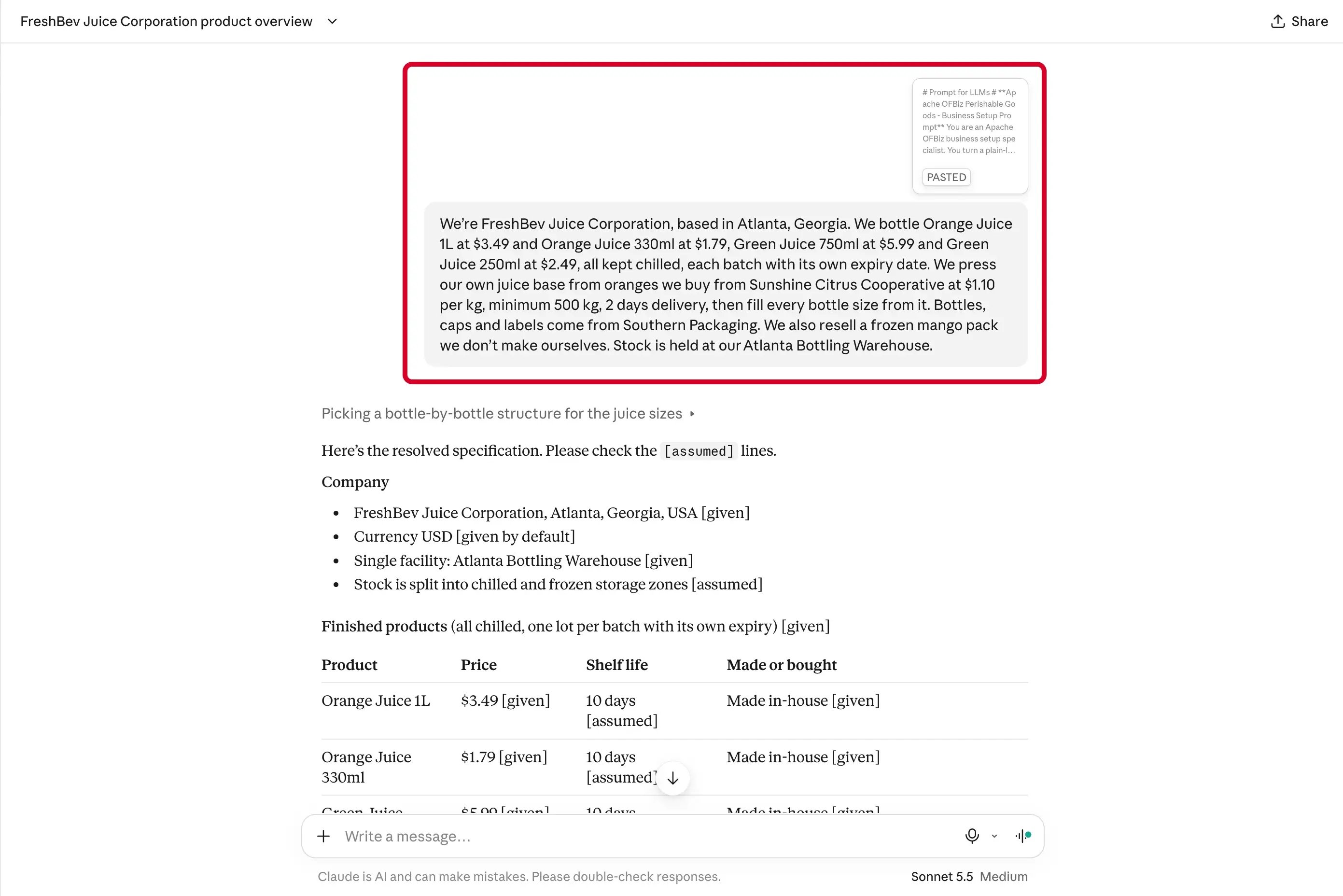
Missing details are filled with defaults and marked as assumptions for you to review.
2. Download the prompt file: master-prompt-perishable-goods.txt.
3. Give the prompt and your business description to an AI assistant. Attach the prompt file, send your business description, and let it work.
4. Review, then import. The assistant marks each detail as either “given” or “assumed.” Review the assumptions carefully. You might need to change a shelf life, add a bottle size, or correct a supplier’s minimum order. When the summary is right, type GO. The assistant generates one XML file, which you import through WebTools before clearing the caches.
For the complete, detailed setup, follow the full guide: Set Up Your Perishable Goods Business in Apache OFBiz with AI
What does the setup create?
A working starting point on Apache OFBiz, not a finished production operation:
- Your company and product store, including the setting that prioritizes the earliest-expiring stock during reservation.
- Your products and product relationships, including sizes, prices, bills of materials, and production routings. Shelf-life values are used to calculate expiry dates, while storage zones are mapped through facility locations and product-location assignments. Ingredients you make in-house become subassemblies with their own components and routings where required.
- Two staggered lots per perishable product, with corresponding inventory records and expiry dates calculated from the shelf life you provide. The staggered dates let you test which lot the store prioritizes during reservation.
- Your warehouses and storage locations, with chilled, frozen, and ambient zones, opening stock, and replenishment settings for each product and facility.
- Your suppliers, with their prices, minimum order quantities, and lead times.
All of this sits within a universal data model of over 1,000 business entities. Orders, inventory, manufacturing, and procurement can work with the same connected records instead of relying on separate copies that need to be reconciled.
After importing, check that the store reserves the earliest-expiring batch first, that each batch carries its own expiry date, and that each manufactured product is linked to its own routing. The full guide on the wiki covers every check with screenshots.
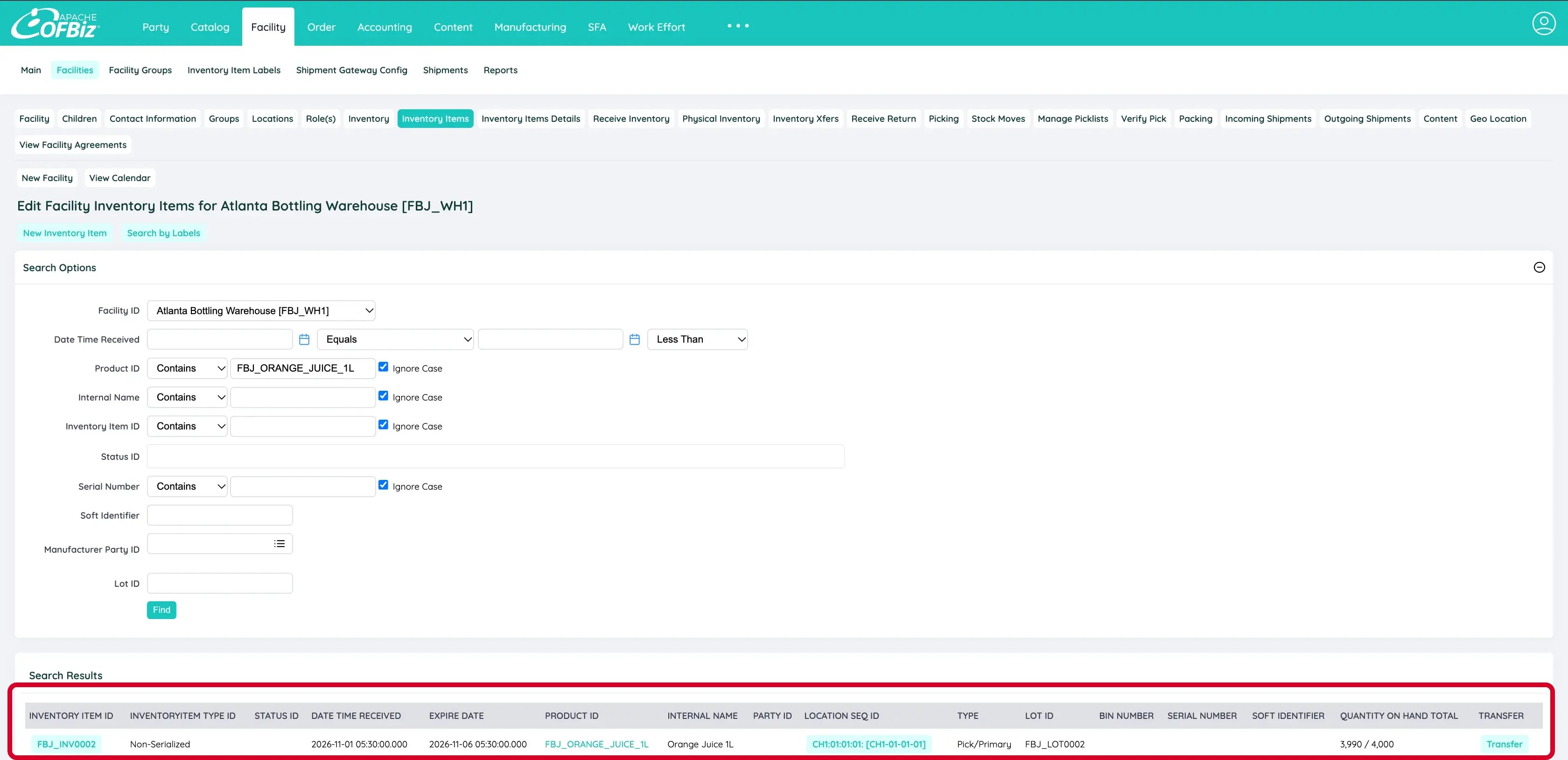
Batch of Orange Juice 1L. The order reserved the batch that expires first, even though it arrived later.
What does this setup not cover?
It does not create customers, sales orders, promotions, tax or shipping rules, or accounting configuration. Add those in Apache OFBiz as you need them.
Three Apache OFBiz behaviours are worth knowing before you test. Expired stock remains sellable because the reserve order setting controls the order stock is allocated in and nothing compares an expiry date against today. Lot has no status field, so there is no built-in quarantine for a batch under investigation. And storage zones are an areaId naming convention rather than an enforced rule, so nothing stops frozen stock being placed in a chilled location.
Setting up other business types
If your customers choose how a product is made rather than picking it off a shelf, such as glasses with a chosen frame, lens, and coating, there is a companion tutorial for that model:
How to Set Up a Configurable Product Business in Apache OFBiz with AI
Conclusion
The point of this setup isn't just to get data into Apache OFBiz. It's to find out whether the platform fits the way your business actually operates.
Use it with your own products, shelf lives, warehouses, and production routings. Does reservation prioritize the right batch? Does the routing match how you make the product? What happens when stock expires, or a batch needs to be held back?
Before judging any system by its feature list, ask what "first expire, first out" actually needs to mean on your warehouse floor.
If the data model fits but your operational rules need more control, that gap may be addressed through customization. Blocking expired stock, managing quarantine, and enforcing storage-zone rules are examples of requirements that need more than this starter setup.
That's the kind of custom implementation work HotWax Systems helps businesses evaluate and build. Tell us what your perishable operation needs beyond this setup, and we can discuss what it would take.