/DevOps%20-Proccess.webp)
/DevOps%20-Questions.webp)
How the Right DevOps Discovery Questions Shape Apache OFBiz Architecture


Planning a production ready system goes far beyond picking cloud services or sketching a cloud infrastructure architecture diagram. At HotWax Systems, our DevOps team plays a central role in shaping cloud infrastructure for Apache OFBiz deployments that are built to scale, stay secure, and perform reliably in real production environments. We work closely with clients, whether they have in house cloud expertise or rely on us to guide critical infrastructure decisions. Our focus remains clear: ensure Apache OFBiz scales smoothly, runs reliably, and aligns with each client’s unique business processes.
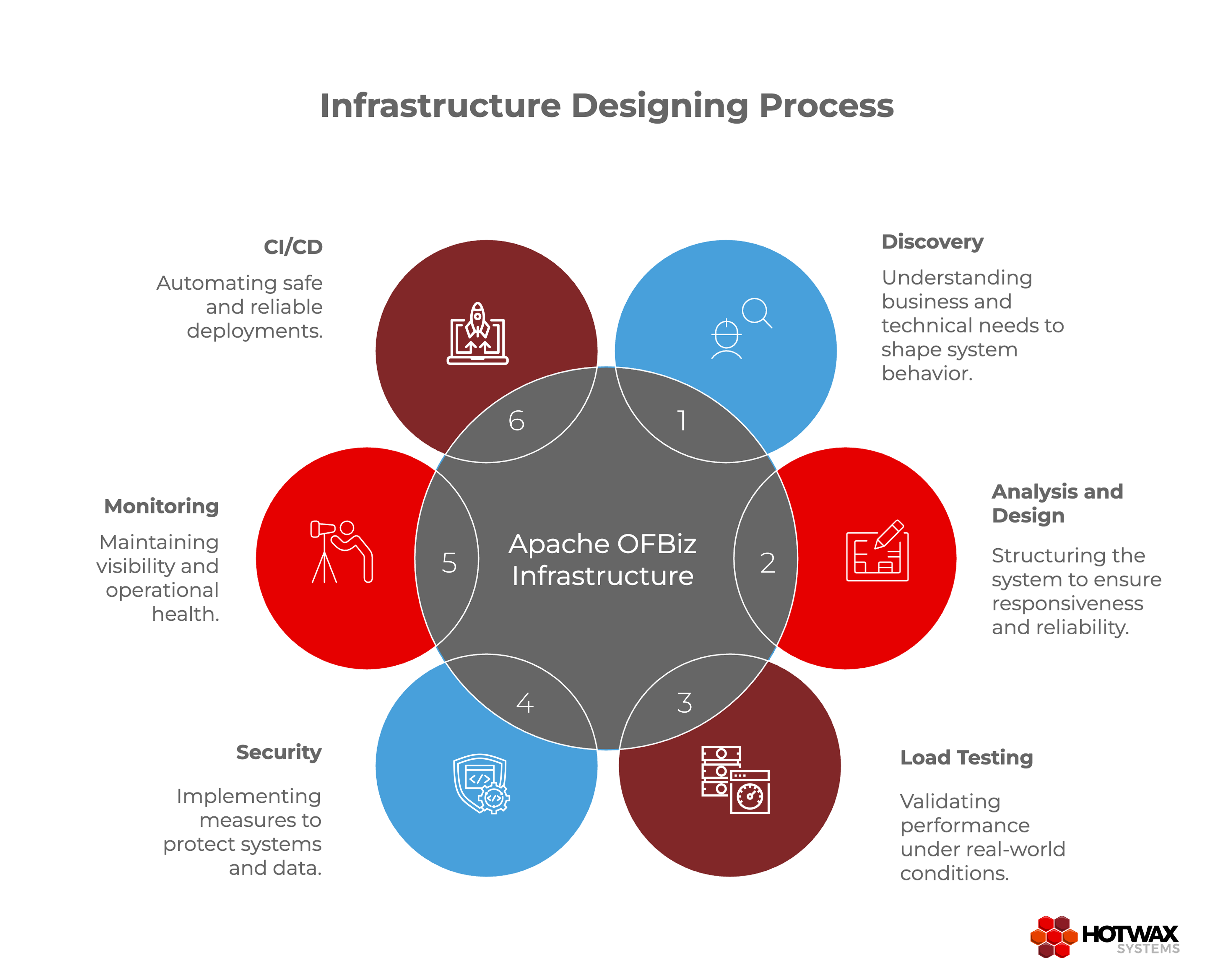
This blog outlines the key stages we follow before any cloud infrastructure architecture diagram is finalized. It is the first in a series, with future blogs exploring anonymized case studies inspired by our past experiences and the architecture decisions behind them.
Every design begins with understanding. In this phase, we gather the information that will shape the system’s behavior, resilience, and underlying cloud infrastructure.
By answering these questions, we create a clear picture of operational needs. For example, a retail client may see traffic spikes during promotions, while a logistics client may rely heavily on nightly batch jobs. Discovery ensures that every subsequent design decision is grounded in real-world expectations.
This understanding naturally feeds into system analysis, guiding how workloads are separated, what integrations are critical, and which security controls are mandatory.
Once discovery is complete, we translate requirements into system behaviour and cloud infrastructure design. Apache OFBiz handles diverse workloads, and our design must ensure responsiveness and reliability.
Example approach:
User-facing APIs often run on dedicated servers, while batch jobs or integrations execute on separate machines optimized for CPU or IO-heavy tasks. We also evaluate whether a dedicated Apache Solr server is needed for search workloads or how many servers should handle synchronous versus asynchronous processing. Machine sizing, number of servers, and workload distribution are determined based on analysis and our past experience.
Cloud services are chosen with purpose: AWS is commonly used, and service selection is based on workload type rather than convenience:
By the end of this phase, we have a proposed infrastructure blueprint detailing the number of servers, workload separation, machine sizes, and service selection.
It’s critical to validate that the proposed architecture meets expectations. This naturally leads to the next phase: load testing under realistic conditions.
Designs are only useful if they work under real-world conditions. Load testing allows us to verify the infrastructure’s performance and identify potential bottlenecks.
Before running tests, developers prepare the system using tools like JMeter to simulate realistic traffic and user activity. The DevOps team then monitors and analyzes key metrics to understand how the system behaves under stress.
Key areas we analyze include:
Scenarios we test include:
Tuning and Optimization:
After analyzing the metrics, the team tunes the infrastructure as needed. For example, we may adjust machine sizes, increase the number of servers handling API requests, or optimize database connections. This ensures that the system can handle both synchronous and asynchronous workloads efficiently under expected traffic.
Example insight:
During testing, batch servers may handle workloads perfectly, while the API server experiences latency under peak requests. By monitoring API performance and tuning the server configuration, we ensure smooth user experience and consistent system performance.
Successful load testing and tuning give us confidence in the proposed cloud infrastructure and inform the next stages of deployment readiness.
After validating performance, we finalize security controls to protect both the cloud infrastructure and Apache OFBiz application data. Security is designed proactively, not as an afterthought.
Implementing these controls after load testing ensures that the tuned infrastructure remains secure under expected traffic patterns and workload stress.
Monitoring is closely linked with security and operational resilience. Once security is in place, we establish observability to maintain system health and proactively detect issues.
Monitoring lays the foundation for reliable operations and provides feedback to optimize the system over time.
With monitoring and security established, we define CI/CD pipelines to safely move changes from development to production.
Common tools include GitHub Actions, GitLab CI/CD, Jenkins, and DevOps Pipelines. CI/CD ensures consistent, repeatable, and safe deployments while reinforcing all the planning, testing, and monitoring work from previous phases.
Only after these stages, discovery, analysis and design, load testing, security, monitoring, and CI CD planning, do we create a cloud infrastructure architecture diagram. This diagram reflects the full cloud infrastructure behind the deployment. Every element, from servers to pipelines, is deliberate, validated, and tailored to real production workloads.
For clients with in house IT expertise, the cloud infrastructure architecture diagram helps guide technical discussions and approvals. For clients without cloud expertise, it becomes part of our end to end solution, clearly showing how we design and deploy Apache OFBiz to meet business and operational goals.
This structured approach ensures every deployment is scalable, secure, and resilient from day one. In the next blogs, we will explore anonymized case studies drawn from our past experiences and show how this process shaped specific architecture decisions.



/A%20case%20study%20of%20monolithic%20Deployment%20model%20of%20Apache%20OFBiz_2.webp)
/How%20to%20Set%20Up%20Apache%20OFBiz%20with%20Apache%20HTTP%20Server.webp)