How Our DevOps Team Designs Scalable and Secure Cloud Infrastructure for Apache OFBiz


In an earlier blog, we walked through the structured process the DevOps team at HotWax Systems follows before proposing an infrastructure for Apache OFBiz. One of the most important stages in that process is analysis and infrastructure system design, where we work closely with the client and internal development teams through a carefully defined set of questions.
In this blog, we go a step deeper. We explain why those questions are asked and what each one reveals about how Apache OFBiz is actually used. More importantly, we show how these discussions shape DevOps architecture decisions, influencing security, availability, scalability, and cost. By understanding the intent behind the questions, it becomes clear that this is not a checklist driven exercise, but a deliberate approach to building a infrastructure that aligns with real business and operational needs.
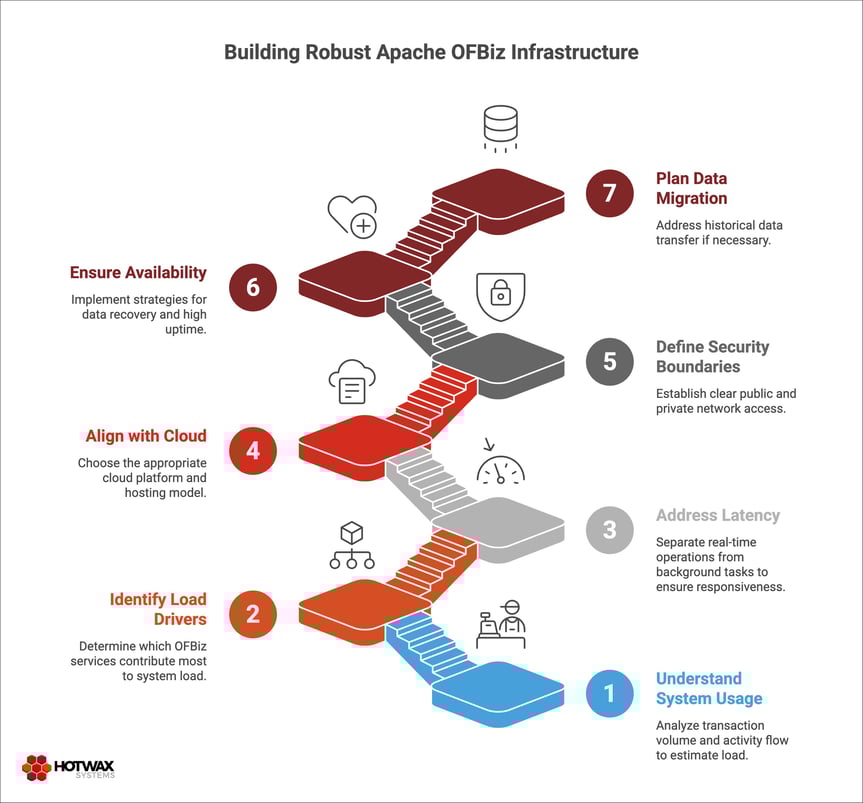
We always begin by understanding system behaviour, not infrastructure preferences.
One of the first questions we ask is about expected transaction volume during normal days and peak periods. This is not about counting orders. It is about understanding how activity flows through Apache OFBiz.
Consider a typical warehouse fulfillment flow. When a warehouse manager opens the pick list, one API call fetches the items to be picked. As the picker moves through the warehouse, each item scan generates system activity. For a simple order with a few line items, this alone can result in two to three API calls. Bundling items into a package adds another update. Packing the order triggers an API call to finalize fulfillment and create delivery documents. Finally, when the order is ready, an external shipping or carrier system is notified.
Even for a straightforward order, this results in roughly six to seven API calls during fulfillment. More complex orders with additional line items or validation steps generate even more activity.
Now imagine a single warehouse running 10 packing stations and fulfilling around 1000 orders in an hour. That translates to 6000 to 7000 thousand API calls per hour from fulfillment alone. Multiply this across multiple warehouses operating in different locations, while inventory updates, routing decisions, and background processes continue to run in parallel, and the load grows quickly.
Understanding this system behaviour helps us estimate the real load placed on application servers, databases, and networks. These insights guide early DevOps architecture design decisions such as how many servers are required, how they should be sized, and how database connections should be managed.
Once baseline behaviour is clear, we look at peak usage hours and seasonal spikes. Daily averages often hide pressure points. Systems usually run smoothly during normal hours but feel strain during short periods of heavy activity.
For example: Shipping cutoffs, end of the day warehouse operations, and peak seasons naturally increase system usage. During these windows, scanning activity rises quickly and more requests reach the system in a shorter span of time.
By understanding when peaks occur and how intense they are, we can design infrastructure for peak case behaviour rather than normal hours. This directly affects auto scaling strategies, load balancer configuration, and decisions around workload isolation (we will see these later).
After understanding overall system activity, we look at how much load different Apache OFBiz services place on the system and how frequently they run. This step is essential to cloud computing architecture design because not all services stress the system in the same way or at the same time.
Apache OFBiz consists of various applications like OMS, MEPS, Warehouse Management System and these applications themselves have their own service and not all services behave the same under load. Some are lightweight and user facing. Actions such as order lookups or status checks complete quickly and release resources almost immediately. Others run deeper in the system and place greater demands on infrastructure. Inventory updates, routing logic, store fulfillment processing and work execution services often touch multiple tables, trigger additional processing, and hold resources for longer periods.
Execution patterns also matter as much as service type. Some services are invoked continuously through user activity. Others run on schedules, creating short but intense bursts of load. When scheduled executions overlap with peak fulfillment windows, overall system pressure increases.
A common example is importing orders from third party systems such as Shopify. These imports often bring in thousands of orders at once and process them in parallel. This creates a sudden spike in threads, database activity, and memory usage. If user facing services are running on the same machine, warehouse users may experience slow responses or failed requests during the import window.
Understanding this behaviour helps us decide where workload separation is required like Import processing can run on dedicated infrastructure in the background, while user facing services run on separate machines so that day to day operations remain responsive.
Once we understand how services behave under load, we design the compute layer to match how the system is actually used, a critical step in building a stable DevOps architecture. Our default approach for cloud computing architecture design is one application per machine. This limits the impact of failures, keeps security boundaries clear, and makes scaling more predictable.
After understanding the service load we ask: How critical is batch or asynchronous processing, and do we need separate infrastructure for it?
Batch and asynchronous jobs often consume significant system resources. Inventory syncs, imports, exports, and scheduled processing can overwhelm user-facing APIs if they share the same infrastructure.
Understanding how critical these jobs are helps us decide whether they should run on dedicated servers. Separating async workloads ensures stable performance for users performing real time operations.
These decisions come from production experience with Apache OFBiz. By aligning compute design with real workload behaviour, we build systems that remain stable as volume grows, not just systems that perform well in early testing.
After understanding the load on the system and load from each service, next we decide system latency.
Latency determines where systems should run and how workloads should be placed so that data flows quickly and users can complete actions without delay. This is a critical part of devOps architecture design. Latency sensitivity matters because it directly shapes how people experience the system.
For example, some actions demand immediate feedback. A warehouse scan, an order confirmation, or a payment check must feel instant. When these actions slow down, users hesitate, retry, or abandon the task. That behaviour
increases traffic and can quickly turn a small delay into a system wide issue.
During infrastructure design, we separate work that must respond immediately from work that can wait. Real time requests need low latency paths, predictable performance, and priority access to resources. Background activities such as reports, batch imports, reindexing or large data processing jobs can tolerate delays and are designed to run asynchronously or during off peak hours.
Latency sensitive analysis also exposes hidden contention. A system may appear stable on average but still struggle when a long running job consumes CPU, memory, database connections, or network bandwidth. By identifying which flows are latency sensitive, we can isolate them, introduce queues, apply rate limits, or scale them independently.
In short, latency sensitivity guides architectural decisions. It helps protect critical user journeys, avoid issues, and keep the system responsive as load grows.
Once we understand overall system load, how individual Apache OFBiz services behave under that load, and where latency sensitive workloads should run, the next we ask - Will the infrastructure be hosted on the client's cloud account or HotWax's account?
We start by clarifying where the infrastructure will be hosted. Some teams prefer to run the infrastructure in their own cloud account, while others rely on HotWax Systems to manage the cloud environment on their behalf. We also confirm the preferred cloud platform, such as Amazon Web Services or Google Cloud Platform.
These decisions sit at the core of cloud computing architecture design and influence how we design network boundaries, access controls, and security policies from the start. Cloud choice also affects the availability of managed services, monitoring tools, and identity and access management models.
By aligning infrastructure design with existing cloud preferences and operational practices early, we avoid rework later and ensure smoother long term operations.
Once the initial infrastructure is outlined and core services are identified, the focus shifts to access and security boundaries. At this stage, cloud infrastructure security becomes a primary concern, the key question is simple but critical. Which applications must be reachable from the public internet, and which should remain private?
Not every service needs to be exposed, even when the system integrates with external platforms. Apache OFBiz often connects with third party systems, message queues, and carrier services, but these integrations do not require all components to be publicly accessible.
We clearly separate public facing components from internal services. Only the components that must handle external traffic are exposed, and they are placed behind managed entry points such as load balancers. In front of these load balancers, a Web Application Firewall (WAF) acts as the first line of defense. The WAF inspects incoming requests and blocks common threats such as injection attacks, malformed payloads, and abusive traffic patterns before they reach the application.
Publicly accessible components receive stricter controls. The WAF enforces rate limits and security rules, while access logs and metrics provide visibility into traffic behaviour. This ensures that malicious or unexpected requests are filtered at the edge, protecting application performance and availability.
Internal services remain inside private networks with no direct internet exposure. They communicate only through controlled internal routes, reducing the attack surface and limiting the impact of potential security incidents.
Making these decisions early shapes the entire cloud infrastructure security design. Internal only systems can operate within private networks with tightly controlled access points. Public facing components require additional protection layers such as WAF and edge filtering from the start. By defining access boundaries upfront, we avoid overexposing systems during early deployment and prevent costly security changes later.
This approach keeps the architecture clean, limits risk, and ensures security scales naturally as the system grows.
Data availability also sits at the core of every Apache OFBiz deployment. The design starts by understanding how quickly the system must recover from failures and how much data loss, if any, is acceptable. These two expectations shape every decision that follows.
Rather than assuming a default setup, we define recovery time and recovery point objectives based on business impact. A system that must recover within minutes and tolerate little to no data loss requires a very different database architecture than one that can afford longer recovery windows.
Backup strategies, database replicas, and multi zone deployments are evaluated as part of this process. Regular backups protect against data corruption and human error. Replicas improve read availability and reduce recovery time. Multi zone configurations protect against infrastructure level failures. Each option improves resilience but also adds operational complexity and potential latency, so the choice must be intentional
A system designed for 99.9 percent availability can tolerate several hours of downtime in a year. A system targeting 99.99 percent availability allows only minutes. This difference fundamentally changes how databases are deployed and operated.
Higher availability targets typically require database replicas, automated failover, regular backup validation, and carefully planned upgrade strategies. Without clear agreement on acceptable downtime and data loss, it is impossible to make informed tradeoffs between reliability, complexity, and cost.
By grounding database availability and recovery decisions in business requirements, we ensure the Apache OFBiz deployment remains resilient, predictable, and aligned with real operational needs.
Planning for historical data migration is an optional step and is not required for every Apache OFBiz deployment. This discussion is part of the initial discovery process and is raised only to confirm whether historical data exists and whether any transition activity is expected. For greenfield implementations, this step often does not apply.
This step becomes relevant when a client has an existing system and intends to import historical data such as orders, inventory, customers, or financial records into Apache OFBiz. In these cases, the first decision is scope. Not all historical data needs to be operational in the new system. Together with the client, we identify which data must remain active, which is required for reporting or compliance, and which can remain archived in the legacy platform.
Data quality and volume are assessed early to avoid surprises during execution. This helps determine whether a phased migration or a limited cutover window is more appropriate.
For large datasets, importing historical data in parallel with an active system can create performance bottlenecks or throttle existing operations. To prevent any impact on live workloads, data migration is treated as a controlled and isolated activity.
During the initial transition phase, the DevOps team may recommend provisioning a dedicated machine with higher compute and memory capacity specifically for data imports. This allows heavy processing and bulk loads to run independently of application traffic. Once migration is complete, this temporary infrastructure can be scaled down or removed.
Throughout the process, standard security and recovery safeguards are applied. Backups are taken before each migration phase, and rollback paths are clearly defined.
By treating historical data migration as an optional but standard discovery question, we ensure there are no hidden assumptions during planning. This approach helps confirm whether additional infrastructure is required during the transition, while keeping the core deployment simple and unaffected when migration is not needed.
By understanding these questions and their answers, a clear and structured DevOps architecture design is established. This process helps define system data flow, expected load, security boundaries, availability requirements, and recovery strategies before any architecture is finalized.
In the next document, we will present anonymous client case studies that show how this discovery driven approach, guided by these questionnaires and discussions, translates into real infrastructure decisions and outcomes across different Apache OFBiz implementations.