/Preventing%20Concurrent%20Execution%20in%20Apache%20OFBiz%20using%20Semaphores.webp)
/Mastering%20Timezones%20in%20Apache%20OFBiz.webp)
Mastering Timezones in Apache OFBiz - An Architectural Guide for CTOs and Business Leaders


Modern enterprise systems execute large volumes of operations simultaneously. An Order Management System (OMS) may be importing orders from eCommerce platforms, synchronizing inventory across warehouses, generating fulfillment tasks, sending shipment confirmations to ERP systems, and processing scheduled jobs, all at the same time.
Apache OFBiz supports this high-throughput processing through Java's multithreaded execution model. Services and jobs can run concurrently using worker threads and asynchronous job queues, allowing Apache OFBiz-based systems to scale efficiently under heavy workloads.
However, concurrency introduces an important challenge:
What happens when multiple executions of the same workflow run at the same time?
In highly concurrent systems, some workflows may take several minutes to complete while operating on shared business data or coordinating with external systems.
If the same workflow is triggered again before the first execution finishes, overlapping executions may process the same business data twice, leading to duplicate operations, inconsistent sequencing, or conflicting updates across systems.
These types of issues are commonly known as race conditions, and in enterprise environments they can create serious operational and financial problems.
To address this, Apache OFBiz provides a built-in concurrency-control mechanism called a semaphore.
Apache OFBiz semaphores allow developers to control whether a service can execute concurrently or whether it must run in a serialized manner. They are especially useful for long-running workflows, scheduled jobs, and external integrations where overlapping execution can produce inconsistent outcomes.
In this article, we will explore:
The goal is not simply to explain semaphore configuration syntax, but to help Apache OFBiz developers understand semaphores as a workflow-coordination mechanism for enterprise software systems.
Apache OFBiz leverages Java's multithreaded execution model to process multiple operations simultaneously.
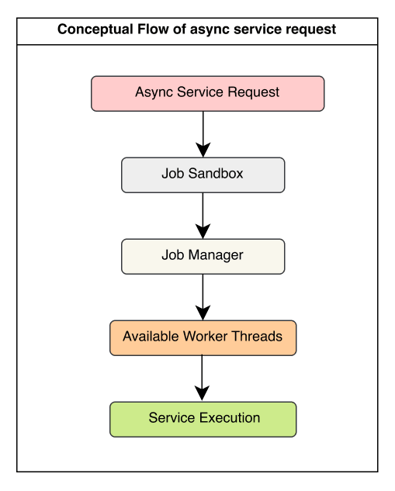
When asynchronous services are triggered, jobs are typically stored in the JobSandbox entity. The Job Manager continuously scans for pending jobs and assigns them to available worker threads for execution.
Conceptually, the flow looks like this:
Suppose:
In that case:
This concurrent execution model is one of the reasons Apache OFBiz scales effectively in high-volume environments.
However, not every process is safe to execute concurrently.
Some workflows operate on shared business operations and can produce inconsistent results if multiple executions overlap. Common examples include pick wave planning, ERP synchronization, FTP polling, external API integrations, and scheduled export jobs.
If multiple executions of the same workflow run simultaneously, the system may process the same records twice, generate duplicate transactions, send duplicate data to external systems, or violate sequencing rules.
Apache OFBiz semaphores help control this type of overlap by allowing sensitive workflows to execute in a serialized manner while the rest of the system continues processing concurrently.
The primary purpose of a semaphore in Apache OFBiz is to prevent overlapping execution of sensitive workflows.
Certain enterprise processes are inherently long-running or batch-oriented. These workflows often:
If multiple executions run simultaneously, the same business data may be processed more than once. In practice, these concurrency issues usually appear inside long-running operational workflows where timing, sequencing, and coordination matter. Let's look at some real-world examples based on our experiences:
Consider a warehouse management system where a scheduled service generates pick waves for fulfillment operations. A typical wave planning workflow may:
In large warehouse environments, this process may take several minutes to complete.
Now imagine:
Without concurrency control, both executions may select overlapping orders because the first workflow has not yet completed. This can result in duplicate picklists, duplicate fulfillment tasks, inventory inconsistencies, or even duplicate shipments. The issue here is not database corruption. The problem is overlapping execution of the same operational workflow.
A similar problem occurs during external system integration. Suppose Apache OFBiz periodically sends shipment confirmations to an ERP platform. If multiple synchronization jobs run simultaneously, duplicate payloads may be transmitted, external systems may create duplicate transactions, sequencing inconsistencies may occur, or API rate limits may be exceeded. In this case, the concern is not only concurrency inside Apache OFBiz, but maintaining consistency across distributed systems.
Concurrency risks also appear in clustered Apache OFBiz deployments. Consider a service that polls an FTP location and processes incoming files. Without coordination, Server A may begin processing a file while Server B picks up the same file almost simultaneously. This can lead to duplicate imports and inconsistent downstream processing.
Similar concurrency risks appear with scheduled services running in clustered Apache OFBiz deployments. Suppose multiple OFBiz servers share the same database and scheduler configuration. If a scheduled workflow triggers simultaneously on multiple nodes, the same job may begin executing in parallel across different servers.
For example:
Without coordination, duplicate exports, duplicate external API calls, inconsistent sequencing, or conflicting updates may occur across integrated systems.
Apache OFBiz semaphores help prevent this type of scheduler overlap by allowing only one execution of the workflow to proceed across the entire cluster.
Apache OFBiz semaphores are primarily designed for workflow-level coordination. They are most useful when:
Semaphores are not intended to solve low-level database locking or transactional design issues. Those problems are usually better addressed through transaction redesign, batching, indexing, or retry mechanisms.
It is also important to understand that semaphore lifetime is not necessarily the same as database transaction lifetime. In Apache OFBiz, a semaphore protects the overall service execution workflow, while database transactions may begin, commit, rollback, or restart multiple times during that workflow. A long-running service may involve several smaller transactions internally, but the semaphore lock can remain active for the entire service execution duration. This distinction is important because semaphores coordinate workflow execution at the service layer, not low-level database transaction boundaries.
This distinction is important because overusing semaphores in highly parallel systems can unnecessarily reduce throughput and create scalability bottlenecks.
Apache OFBiz semaphores operate at the service definition level. They protect execution of a service invocation, not arbitrary database operations outside the service engine. It is a concurrency-control mechanism that prevents multiple instances of the same service from executing simultaneously. At a high level, it acts as a workflow-level lock around service execution. Before a semaphore-enabled service begins running, Apache OFBiz checks whether another execution of the same service is already active. If another execution is in progress, the new execution may wait, or fail immediately, depending on the semaphore configuration. This allows developers to serialize workflows that are unsafe to execute concurrently.
It is useful to think of an Apache OFBiz semaphore as a workflow-coordination mechanism rather than a traditional database lock. Examples we saw in previous sections like Pick Wave generation, ERP synchronization are operational processes composed of multiple steps executed together as a single workflow. Semaphore ensures that only one execution of that workflow runs at a time.
Developers coming from Java backgrounds may notice similarities between Apache OFBiz semaphores and Java's synchronized keyword.
For example:
public synchronized void syncOrders() {
    ...
}
In Java, synchronized ensures that only one thread can execute the protected code block at a time within the same JVM instance.
Apache OFBiz semaphores solve a similar coordination problem, but at the service layer and across distributed environments. Let's look at detailed comparison table
| Aspect | Java synchronized | Apache OFBiz Semaphore |
|---|---|---|
| Scope | Works only within a single JVM | Works across multiple Apache OFBiz nodes |
| Locking Mechanism | Uses in-memory thread locking | Uses database-backed locking |
| Cluster Awareness | Not cluster-aware | Cluster-aware and distributed |
| Coordination | Coordinates threads inside one application instance | Coordinates workflows across distributed environments |
| Persistence | Lock exists only in JVM memory | Lock state is stored in the database |
| Multi-Node Support | Does not prevent concurrent execution on different servers | Prevents overlapping execution across all cluster nodes |
| Typical Usage | Thread safety for shared in-memory objects | Enterprise workflow and batch job coordination |
| Failure Recovery | Lock disappears if JVM crashes | Database state can help manage/recover distributed locks |
| Best Fit | Local concurrent programming | Distributed enterprise systems and scheduled workflows |
Apache OFBiz stores semaphore state in a database table named SERVICE_SEMAPHORE.
This table acts as a centralized lock registry for semaphore-enabled services. When a service starts, Apache OFBiz checks whether a lock already exists, creates a lock record if none exists, and removes the lock after execution completes. Because lock state is stored in the database rather than application memory, semaphore coordination works consistently across all Apache OFBiz servers sharing the same database.
Although semaphore state is stored in the database, SERVICE_SEMAPHORE should not be confused with traditional database row locking mechanisms. Apache OFBiz uses this table as an application-level coordination registry that helps distributed Apache OFBiz nodes serialize sensitive workflows across clustered environments.
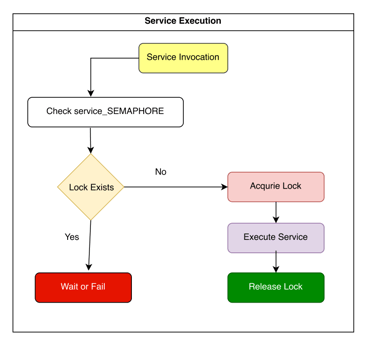
When a semaphore-enabled service is invoked in Apache OFBiz, the Service Engine performs an additional lock check before allowing the workflow to execute.
At a high level, the execution flow looks like this:
Suppose a semaphore-enabled service is configured like this:
<service name="syncFulfillmentToERP"
         engine="java"
         semaphore="wait"
         semaphore-sleep="500"
         semaphore-wait-timeout="300">
The service may be triggered:
Before execution begins, Apache OFBiz checks whether another instance of the same service is already running.
Conceptually, the Service Engine performs a lookup similar to:
SELECT *
FROM SERVICE_SEMAPHORE
WHERE SERVICE_NAME = 'syncFulfillmentToERP';
If no lock exists, Apache OFBiz creates a lock record, associates it with the current thread and server instance, and proceeds with execution. If a lock already exists, Apache OFBiz knows another execution of the same workflow is already active. At that point, behavior depends on the semaphore configuration.
If configured with:
semaphore="fail"
the service immediately returns an error instead of executing. This mode is commonly used for duplicate UI submissions, payment operations, or workflows where immediate retry is unnecessary.
If configured with:
semaphore="wait"
the thread enters a retry loop. The Service Engine pauses the thread, sleeps for the configured interval, checks the lock again and repeats until the lock is released, or timeout is reached.
For example:
semaphore-sleep="500" semaphore-wait-timeout="300"
means:
Once the lock becomes available, Apache OFBiz acquires the semaphore lock, executes the workflow, and prevents parallel execution of the same service during that time.
This effectively serializes execution of the protected workflow.
After execution completes, OFBiz removes the corresponding lock record, allowing future executions to proceed. This cleanup normally occurs automatically, even if the service throws an exception.
Semaphore behavior becomes especially important for asynchronous services. The async execution flow typically looks like this:
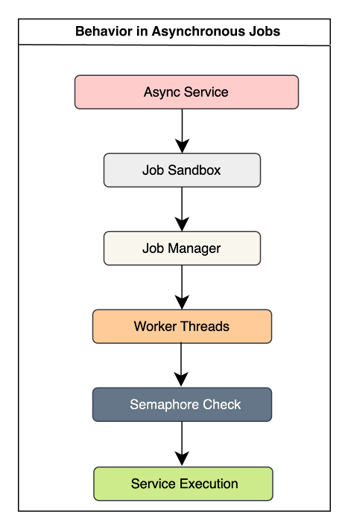
An important detail is that the worker thread is already occupied once the async job starts executing. If semaphore="wait" is configured, the thread remains engaged while repeatedly checking the lock, even though actual business processing has not yet started. This is one reason excessive semaphore usage can reduce throughput in heavily asynchronous systems.
Because semaphore state is database-backed, all Apache OFBiz nodes share the same lock visibility. For example:
This allows Apache OFBiz semaphores to coordinate workflow execution across distributed application servers, not just within a single JVM.
The SERVICE_SEMAPHORE table is the core component behind semaphore-based coordination in Apache OFBiz. It acts as a centralized lock registry for semaphore-enabled services. Whenever a protected service begins execution, Apache OFBiz creates a corresponding lock record in this table. As long as that record exists, other executions of the same service know that the workflow is already active.
| Field | Purpose |
|---|---|
| serviceName | Name of the locked service |
| lockedByInstanceId | OFBiz server instance holding the lock |
| lockThread | Thread currently executing the service |
| lockTime | Timestamp when the lock was acquired |
Administrators and developers can inspect active semaphore locks directly from the database. Example:
SELECT * FROM SERVICE_SEMAPHORE;
This helps identify stuck workflows, long-running locks, cluster-wide contention, and potentially stale semaphore records.
Under normal conditions, Apache OFBiz automatically removes semaphore records after workflow execution completes. However, stale locks can occasionally occur if:
In these situations, the workflow may stop running while the semaphore record remains in the database. As a result, future executions may continue waiting or repeatedly fail because Apache OFBiz still believes the workflow is active. In production systems, administrators may occasionally need to manually remove stale semaphore records after verifying that no active execution still exists.
As already discussed, in Apache OFBiz, semaphores are configured directly in the service definition inside services.xml. This allows developers to selectively enable concurrency protection only for workflows that require serialized execution. A typical semaphore-enabled service definition looks like this:
<service name="syncFulfillmentToERP"
         engine="java"
         location="org.apache.ofbiz.integration.erp.ErpServices"
         invoke="syncFulfillment"
         semaphore="wait"
         semaphore-sleep="500"
         semaphore-wait-timeout="300">
</service>
Semaphore behavior is controlled using three primary attributes:
The semaphore attribute determines how Apache OFBiz behaves when another execution of the same service is already active. Possible values are:
The most important semaphore design decision is choosing between wait and fail.
The core question is simple:
Should the workflow wait for its turn, or should it immediately give up?
When configured with semaphore="wait", Apache OFBiz pauses the current execution until the active workflow finishes. This mode is commonly used for:
These are situations where the work must eventually complete, but overlapping execution would create operational risk.
When configured with semaphore="fail", the service immediately returns an error if another execution is already running. This mode is commonly used for duplicate UI submissions, payment processing, voucher generation, or user actions where immediate retry is unnecessary.
Operationally, fail is far lighter and more scalable because the worker thread exits immediately instead of remaining occupied while waiting.
The semaphore-sleep attribute controls how frequently Apache OFBiz retries lock acquisition while waiting. Example:
semaphore-sleep="500"
means:
The semaphore-wait-timeout attribute defines the maximum amount of time OFBiz should wait before giving up. Example:
semaphore-wait-timeout="300"
means:
If the timeout is reached, the service returns an error and execution does not proceed. Long wait durations should be used carefully because waiting threads still consume resources and can slow asynchronous processing under heavy load.
Semaphores are powerful workflow-coordination mechanisms, but they should be used selectively.
The goal of semaphore is not to suppress concurrency everywhere. The goal is to prevent overlapping execution in workflows where duplicate processing or incorrect sequencing can create operational problems.
Semaphore is generally appropriate when:
Workflows that are often long-running, batch-oriented, or integration-heavy, making them unsafe to execute concurrently.
In such cases, semaphore helps ensure that only one execution of the workflow runs at a time.
Semaphores are not a universal solution for concurrency problems. Used incorrectly, they can reduce scalability, create bottlenecks, slow asynchronous workloads, increase queue buildup, and unnecessarily serialize operations that could safely run in parallel.
One of the most common architectural mistakes is using semaphores to hide deeper transactional or scalability problems. Many enterprise workloads are naturally parallelizable.
Some examples based on our past experiences include:
In these cases, workers may safely process different datasets in parallel, concurrency may already be controlled through statuses or batching, or transactional consistency may already exist at the database layer. Adding semaphore unnecessarily forces these workloads into serialized execution, which can dramatically reduce throughput. Let's look at the real-world examples where we have used semaphores as per original design, however we had to remove semaphores due to various issues.
In earlier implementations, semaphores were sometimes added around inventory reservation services to avoid reservation conflicts. In high-volume OMS environments, this often created major scalability problems.
Consider an OMS processing:
If semaphore is enabled at the reservation service level, only one reservation workflow may execute at a time while all other jobs wait in queue. Instead of leveraging parallel processing, the workload becomes artificially serialized, async queues grow, and throughput drops significantly.
In our custom projects, semaphores were also used in some inventory issuance workflows to reduce database deadlocks involving tables such as:
While semaphore reduced concurrent execution, it did not solve the underlying issue. The real problem was typically related to transaction design, inconsistent lock ordering, large transaction scope, or database contention patterns.
Using semaphore in these situations merely reduced concurrency while masking the actual design problem. Eventually, these semaphores were removed because semaphores should not be treated as a substitute for proper transactional design.
In many enterprise systems, concurrency problems are often better solved using other architectural patterns such as workload partitioning, batching, status-driven processing, idempotent workflow design, or smaller transaction scopes. The appropriate solution depends on the nature of the problem. Semaphore is most effective when the primary concern is preventing overlapping execution of the same operational workflow.
Semaphore reduces concurrency. In some workflows, that tradeoff is necessary to preserve safe execution. However, if semaphore is applied too broadly:
This becomes especially important for asynchronous services. In extreme cases, the async system may appear "stuck" even though threads are simply waiting on semaphore locks.
Before enabling semaphore, developers should ask:
Am I protecting a workflow from overlapping execution, or am I trying to hide a scalability or transactional design problem?
If the issue is primarily:
then semaphore may be appropriate.
If the issue is:
then the real solution usually lies elsewhere. Understanding this distinction is one of the most important architectural lessons when working with concurrency in Apache OFBiz systems.
Semaphores can introduce problems if used incorrectly.
One common risk is deadlock between semaphore-protected services. For example, if Service A acquires a semaphore and calls Service B, and Service B later attempts to call Service A again, both services may end up waiting on each other. In such cases, neither workflow can proceed.
Another operational issue is stale locks. Normally, Apache OFBiz removes semaphore records after execution completes. But if the JVM crashes, the server shuts down unexpectedly, database connectivity is lost, or a container terminates during execution, the semaphore record may remain in SERVICE_SEMAPHORE. Future executions may then continue waiting or repeatedly fail because OFBiz still believes the workflow is active.
Thread starvation is another important risk, especially with semaphore="wait". When many jobs enter a wait state, worker threads remain occupied even though business processing has not started. In high-volume async workloads, this can exhaust thread pools, slow schedulers, and make the job queue appear stuck.
These pitfalls do not mean semaphores are unsafe. Used selectively, they help protect long-running workflows from overlapping execution across threads, schedulers, and clustered servers. Used carelessly, they can introduce deadlocks between services, leave stale locks after unexpected failures, consume worker threads during long waits, and reduce overall system throughput. Used excessively, they can also hide deeper transactional or scalability problems. Understanding this balance is one of the most important architectural lessons when designing high-scale Apache OFBiz systems.
In practice, semaphores work best when used selectively around long-running workflow coordination problems rather than highly parallel transactional workloads. Choosing between wait and fail carefully, minimizing unnecessary serialization, and regularly monitoring semaphore activity are important operational practices in large-scale Apache OFBiz based OMS, WMS, ERP, environments.
At HotWax Systems, our Apache OFBiz experts have spent years building and scaling high volume enterprise systems where performance, reliability, and operational stability matter every day. If you are planning to scale your Apache OFBiz implementation or optimize complex background processing workflows, Connect with HotWax Systems to build systems engineered for stability, speed, and growth.



/Asynchronous%20Services%20in%20Apache%20OFBiz.webp)
/Engineering%20blog%20-Commerceial%20relationships.webp)