/A%20case%20study%20of%20monolithic%20Deployment%20model%20of%20Apache%20OFBiz_2.webp)
/How%20to%20Set%20Up%20Apache%20OFBiz%20with%20Apache%20HTTP%20Server.webp)
Three Ways to Connect Apache OFBiz to Apache HTTP Server


Designing deployment architecture for Apache OFBiz deployments requires more than selecting cloud services or drawing architecture diagrams. At HotWax Systems, our DevOps team follows a structured process to build cloud infrastructure that scales reliably, maintains security, and performs consistently under real production workloads. This approach ensures every deployment aligns with the client's operational requirements and business processes from day one.
This document presents the technical architecture designed for a B2B industrial equipment manufacturer serving enterprise customers across North America. The architecture decisions documented here are grounded in our established infrastructure design process, detailed in two foundational engineering blogs:
This document demonstrates how structured discovery and operational analysis translate into deployment architecture decisions for a B2B manufacturer with complex product configuration requirements, multi-channel ordering, and real-time manufacturing integration needs.
The client is a B2B manufacturer of configurable industrial equipment, serving enterprise customers across construction, logistics, and manufacturing sectors in North America. The business combines precision engineering with made-to-order manufacturing, supplying customized industrial equipment to corporations, distributors, and enterprise purchasing departments.
|
Business Type |
B2B custom industrial equipment manufacturer |
|
Core Offering |
Configurable industrial equipment (machinery, components, accessories) |
|
Markets |
North America (United States and Canada) |
|
Order Volume |
~300 orders per day (~9,000 orders per month) |
|
Sales Channels |
Dealer Orders, Direct Online Orders, Large Enterprise Orders |
|
Manufacturing Partner |
Make-to-order with external manufacturing partner |
|
Key Integrations |
Major enterprise procurement platforms, Third-party manufacturer, ERP systems |
|
Cloud Platform |
Amazon Web Services (US East region) |
The manufacturer sells configurable industrial equipment built from modular components. Each product is assembled by combining a base unit, specialized components, and optional or mandatory accessories. This modular structure allows high customization while maintaining a consistent manufacturing and fulfillment process.
In addition to custom-configured equipment, the company also offers standard accessories and replacement parts through its online channel.
The manufacturer receives orders through three main channels. Each channel represents a different type of buyer and ordering method. The order flow and system activity for these channels are explained in more detail in the Load and Capacity Planning section.
To design deployment architecture for client, we first needed to understand the expected load and usage patterns through a structured discovery process. The senior architecture designer and developers from the HotWax team held detailed discussions with the client, exploring requirements through a comprehensive set of discovery questions.
Below is a summary of key questions explored and the finalized deployment requirements. To learn more about this discovery process and the methodology behind these questions, click here..
| Discovery Area | Key Questions | Client Requirements |
|---|---|---|
| Order Volume | Expected transaction volume during normal and peak periods? Peak usage hours and seasonal spikes? | 300 orders/day during normal periods, peaks of 400-500 during quarterly promotions |
| Services & Operations | Which services are currently used (order management, fulfillment, inventory)? Number of fulfillment centers and their types? | Order management, product configuration, inventory tracking, manufacturing integration |
| Manufacturing | External system integrations? | Third-party manufacturing partner integration for production workflows |
| Availability | Expected uptime and SLA requirements? | Customer-facing order entry and tracking require high availability |
| Infrastructure | Required applications/servers (OFBiz, Solr, database)? Infrastructure hosting (client account or managed)? | Apache OFBiz deployed in monolithic architecture (unified application server), Apache Solr, MySQL RDS |
| Platform | Cloud platform and region? Public accessibility requirements? | AWS US East region (us-east-1), public access required |
| Processing | Batch/asynchronous processing requirements? | Background jobs run on the same server as user-facing operations |
| Database | Database availability and disaster recovery policy? Historical data migration requirements? | Multi-AZ deployment with automated backups and read replica |
We will see how these details are finalized in the next sections.
Before estimating the system load, it is important to first understand how orders flow through the system and how Apache OFBiz operates behind the scenes for this client.
Several background services run continuously to support this process and keep systems synchronized:
Manufacturing status processing
Order import service
Sales order report export to a third-party system
Invoice export to a third-party system
Data warehouse export
Inventory reconciliation within Apache OFBiz
System maintenance jobs in Apache OFBiz
Database read and write operations during order creation and processing
Together, these processes ensure that orders move smoothly from entry to production while keeping all connected systems updated with accurate information.
To design deployment architecture that performs reliablyunder real production conditions, we first analyzed how orders flow through the system across different channels. Understanding order volume, order patterns, and item quantities by channel is essential for accurate load calculation.
To start with, first order entry channels are identified and how much load each channel brings.
The manufacturer processes orders through three channels, each with distinct characteristics:
Note: A single order can contain multiple items; here items are referred to as equipment units
Channel 1 - Dealer Orders Authorized dealers place orders for business customers using the Apache OFBiz eCommerce system. This primary channel accounts for 210 orders per day, representing 70% of daily order volume. Every order has 5 to 8 equipment units.
Dealers navigate through product configuration screens to select base units, add required components, choose optional accessories, and apply corporate pricing agreements. The workflow requires multiple page loads as dealers move through configuration options and submit orders.
Channel 2 - Direct Online Orders Company buyers place orders themselves using the online portal. This channel gets about 15 orders a day. Each order has 2 to 4 equipment units. Buyers who know the products can configure them easily. The steps and pricing checks are the same as dealer orders.
Channel 3 - Large Enterprise Orders Big companies place bulk orders using punchout catalogs, EDI, or file uploads. About 75 orders arrive each day. Each order includes 15 to 25 equipment units. These orders often come in large batches and approval from the managers of the companies is needed before production starts.
For system planning, item count matters more than order count. Work increases with the number of items processed, not just the number of orders.
|
Channel |
Orders per day |
Items per order |
Total items per day |
|
B2B Partner Dealer |
210 |
6 on average |
1,260 |
|
B2B Online |
15 |
3 on average |
45 |
|
Enterprise Procurement |
75 |
18 on average |
1,350 |
|
Total |
300 |
8.85 on average |
2,655 |
During peak promotional periods, order volume increases to 400-500 orders per day, resulting in approximately 3,540-4,425 line items per day.
Once the total number of orders and number of items in each order is calculated, we move to how those orders are fulfilled and how much load this fulfillment generates.
User actions create page requests as they move through the Apache OFBiz web screens.
Daily order entry requests:
Total User-Facing Requests: ~1,635 requests/day
Each page request also runs several internal checks like pricing, inventory, and customer data. These do not create extra web requests, but they increase CPU and memory usage.
Expressed as requests per minute during business hours (8 hours):
Fulfillment Processing: Handling each ordered item after the order is placed.
Manufacturing Partner Integration: After an order is placed, the system sends that order to an external manufacturing company software that will produce the items.
Note: In this case, the client uses a third-party system to manage the manufacturing process. Orders created in Apache OFBiz are sent to the external manufacturing platform, which handles production and returns status updates.
However, this architecture is specific to the client's setup. In many other implementations, manufacturing is managed directly within Apache OFBiz. The platform includes built-in capabilities for manufacturing planning and execution, allowing businesses to manage production workflows, track operations, and monitor production runs within the same system.
Order status checks: The system keeps asking the manufacturing partner for updates on each order.
Status updates from partners: After an order is sent to the manufacturing partner, they send updates back to the system.
Total fulfillment and integration load: 2,655 Fulfillment requests + 300 Order creation requests + 96 Order status requests + 600 Status update requests = ~3,651 requests per day
Expressed as requests per minute:
Background jobs are measured by execution time and throughput, not requests per minute.
|
Job Name |
Frequency |
Execution Time |
Daily Total |
|
Manufacturing Status Processing |
Every 5 min (8 hrs) |
2 minutes |
36 minutes |
|
Order Import Service |
Every 5 min (8 hrs) |
3 minutes |
48 minutes |
|
Sales Order Report |
Daily (midnight) |
60 minutes |
60 minutes |
|
Invoicing Export to third-party ERP |
Daily (1 AM) |
45 minutes |
45 minutes |
|
Data Warehouse Export |
Daily (2 AM) |
36 minutes |
36 minutes |
|
Inventory Reconciliation |
Daily (3 AM) |
24 minutes |
24 minutes |
|
System Maintenance |
Weekly (Sunday 2 AM) |
40 minutes |
~6 minutes/day |
|
TOTAL |
- |
- |
~255 minutes/day (~4.25 hours/day) |
Peak Batch Window (Midnight - 4 AM): Four major jobs run sequentially, requiring approximately 165 minutes (2 hours 45 minutes) of continuous processing.
Normal Day (300 Orders, 2,655 Items):
|
Load Type |
Daily Volume |
Requests per Minute |
|
User-facing requests |
1,635 requests |
~3.4 req/min avg, 5.5 req/min peak |
|
Fulfillment processing |
2,655 requests |
~5.5 req/min |
|
Manufacturing integration |
996 requests |
~2.1 req/min |
|
Total HTTP traffic |
~5,286 requests/day |
~11 req/min avg, ~20 req/min peak |
|
Background job execution |
4.25 hours/day |
Batch processing |
Peak Day (450 Orders, 3,990 Items):
Total HTTP traffic increases to ~7,929 requests/day (~17 req/min average, ~30 req/min peak), while batch processing increases to ~6.4 hours/day.
Order Management Flow Load:
During business hours (8 hours), the order management workflow handles:
Daily totals don't reveal real-time load infrastructure must handle. During operational hours, traffic concentrates during specific time windows.
Most orders are placed during business hours, from 9 AM to 5 PM. Almost all daily system activity is packed into this 8-hour window.
Dealer activity is highest in the morning, between 9 AM and 12 PM. Around 60 percent of daily orders come in during these three hours.
During this morning peak:
Concurrent user activity
At peak times, 15 to 25 users are active at the same time. This usually includes:
Each active user keeps memory, database connections, and search queries open inside the Apache OFBiz system. Together, this requires roughly 75 to 100 database connections during peak hours.
Apache OFBiz's entity engine translates each user action into multiple database operations. A single order creation involves 50-150 database transactions (inserts to ORDER_HEADER, ORDER_ITEM, PRODUCT_CONFIG, INVENTORY_RESERVATION, plus validation queries and status updates).
Database Load:
These database transaction patterns (not HTTP request counts) drive deployment architecture sizing decisions around database memory allocation, connection pooling, and Multi-AZ deployment.
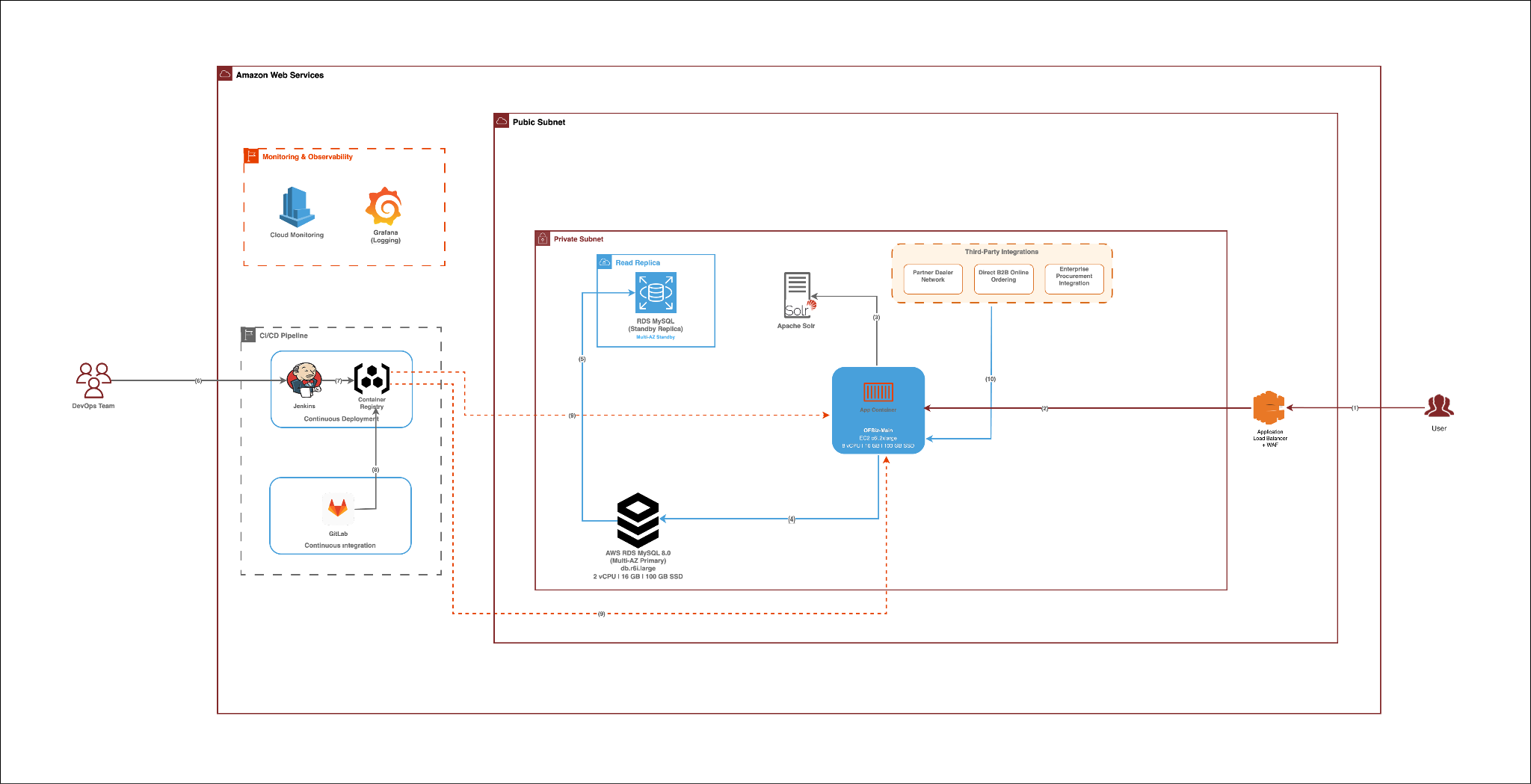
For this deployment handling 300 orders per day with controlled batch processing windows, a unified server architecture efficiently manages both user-facing operations and background jobs on a single application instance.
Traffic Pattern Separation: User-facing traffic concentrates during business hours (9 AM - 5 PM), handling order entry, product searches, and status lookups with peak activity during morning hours. Background jobs execute primarily during off-peak hours (midnight - 4 AM), processing reports, data exports, and system maintenance when user activity is minimal.
Resource Utilization: With 300 orders per day and 4.25 hours of daily batch processing, the workload fits comfortably within a single server's capacity. User-facing operations during the day utilize 20-30% of server resources, leaving ample headroom. Nightly batch jobs execute during a dedicated maintenance window when the system experiences minimal user traffic, preventing resource contention.
Load Characteristics: Peak user-facing load reaches approximately 22 requests per minute during promotional periods—well within the capacity of a properly sized compute-optimized instance. Background jobs run sequentially during the 4-hour nightly window, processing 300-450 orders without competing with real-time user operations.
When Workload Separation Becomes Necessary: At significantly higher volumes (1,000+ orders/day), continuous batch processing throughout business hours, or when background jobs exceed 6-8 hours daily, separating workloads across dedicated servers becomes advisable to maintain consistent user-facing performance.
Manufacturing Integration: Manufacturing work is split based on timing requirements. New orders are sent to the third-party manufacturing system immediately after approval, ensuring production begins without delay. Order status checks run every 5 minutes as scheduled jobs during business hours, updating order progress without impacting user-facing performance.
Apache Solr: Apache Solr runs on a dedicated server to maintain fast search response times. Indexing operations are CPU-intensive and would impact query response times if running on the same JVM as OFBiz. This isolation ensures equipment searches remain fast (50-150ms) even during large catalog updates and enables Solr-specific JVM tuning.
Based on load analysis and the monolithic architecture strategy, we propose the following deployment architecture for the production environment. This monolithic architecture deployment consolidates user-facing operations and background processing on a single unified application server.
|
Server |
Instance Type |
Specs |
Workload |
Peak Load |
Note |
|
Unified Application Server |
c6i.xlarge |
8 vCPU, 16 GB RAM |
All application operations (user-facing and batch) |
22 req/min |
Monolithic architecture server handling all application operations. Supports 15-25 concurrent users during peak with fast response times. Batch jobs run during off-hours (midnight-4 AM). 8 vCPUs enable parallel job execution during nightly batch window. 16 GB RAM supports large dataset processing (300-450 orders) without memory pressure. Normal utilization 15-20% during business hours, providing significant headroom for growth. |
|
Apache Solr |
c6i.large |
2 vCPU, 4 GB RAM |
Product catalog search |
15 searches/min |
Dedicated search server to keep searches fast. Loads the full product catalog into memory so results stay quick even during large updates. |
|
Jenkins CI/CD |
t3.medium |
2 vCPU, 4 GB RAM |
Deployment builds |
5 builds/week |
Used only for deployments. Runs occasionally, stays idle most of the time, and keeps costs low. |
Scaling rules:
|
Component |
Instance Type |
Specs |
Purpose |
Justification |
|
Primary Database |
db.r6i.large (Multi-AZ) |
2 vCPU, 16 GB RAM, 100 GB SSD |
Production workload |
Built for heavy database work. Most memory is used to cache frequently used order, product, and customer data so reads stay fast. Multi-AZ setup gives automatic failover within minutes and prevents data loss, which is critical for order processing. Current load: ~57,000 operations/day with capacity for 85,000+ operations. CPU utilization remains below 50% even during peak promotional periods. |
|
Read Replica |
db.r6i.large |
2 vCPU, 16 GB RAM |
Reporting, backup testing |
Handles reports and analytics so the main database stays focused on live orders. Also used to test backups and adds an extra safety option. |
Why 2 vCPUs are enough?
Even with 300 orders per day (450 during peaks), the database handles around 2,138 operations per minute at peak. CPU usage stays moderate during normal days and reaches 40-50% during promotional peaks. The database workload depends more on memory and disk speed than CPU, so adding more CPUs would not help much. The current configuration provides comfortable headroom for the projected load.
Storage planning:
The database starts with 100 GB of storage and grows automatically as needed.
After three years, total usage is expected to stay within 60 to 80 GB, well within the 100 GB allocation with auto-scaling enabled.
Backup Policy: Automated daily backups (2-4 AM), 7-day retention, point-in-time recovery enabled, encrypted at rest (AWS KMS).
The system is split into three clear security layers:
Security controls are strict and minimal: The load balancer can talk only to the application servers using secure web traffic. The bastion host can access application servers only for secure login. Application servers can access the database only for database traffic. The database does not allow outbound access.
A web firewall protects the system from common attacks like SQL injection and script attacks. It also limits traffic spikes to prevent overload. All data is encrypted while moving between systems and while stored.
The full setup is monitored using AWS CloudWatch.
Alerts follow two paths:
Current capacity comfortably supports between 300 and 500 orders per day.
The unified application server runs at moderate CPU usage during normal days, leaving plenty of room for growth. Background jobs complete within the planned 4-hour nightly window. The database runs well below its limits for CPU and connections.
Scaling happens only when needed:
More servers can also be added if many users are active at the same time or if background jobs grow beyond the 6-hour safe limit.
Costs are controlled by reserving production servers for long-term use and using lower-cost instances for development and testing. Auto-scaling is used to handle busy seasons without paying for unused capacity.
The deployment architecture proposed for this B2B industrial equipment manufacturer demonstrates how structured discovery and operational analysis translate into production-ready deployment decisions for a 300 orders-per-day operation.
The unified server architecture efficiently handles both user-facing operations and background processing, with clear separation between business hours traffic and nightly batch windows. The infrastructure is optimized for the actual load patterns observed in B2B manufacturing operations, providing 3-4x headroom for growth while maintaining cost efficiency.



/DevOps%20-Proccess.webp)
/DevOps%20-Questions.webp)